
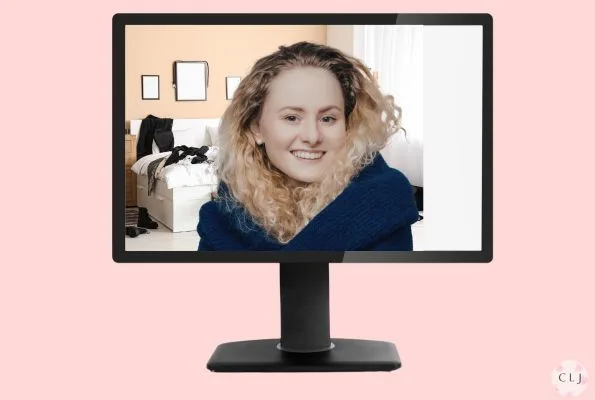
Looking professional is of course, important for business meetings. Taking a virtual or online meeting, such as using Zoom or Teams, is no exception. An important, but often overlooked part of this is the meeting background that you use. However, you may not know what may be appropriate and what makes you look unprofessional. Read this guide to see what backgrounds may make you look unprofessional, so you know what to avoid.
In this article, we refer to a background as both a virtual background, such an image to apply to your online meeting software, and/or your real background, as in the objects that are near or behind you shown by your computer camera. Careful preparation before your next meeting is a small building block for overall career success.
Zoom backgrounds to avoid
While you may have good intentions, here are some common mistakes you may inadvertently make that may give off the wrong impression. Avoid these backgrounds:
- Anything that shows that you are disorganized
- Anything that might give the perception that you don’t care about the meeting.
- Anything that shows that you aren’t working.
- Anything that distracts others from the meeting.
- Anything that might evoke strong emotion.
Examples of unprofessional Zoom backgrounds
Messy Rooms
– rooms with messy clothes, papers, misplaced objects all indirectly point to being disorganized, or not caring. If you are showing your actual background, tidy things up or use a virtual background.

Disorganized Clutter
-unorganized papers, unarranged books, clothes everywhere, kitchen pans stacked up, etc.

Distracting Objects
While these objects may appeal to you and your audience, unfortunately they may distract them too. Ask yourself, ‘does this object have anything to do with my meeting?’ Try to keep your backgrounds neutral and nice but not too eye-catching.

Overly bright or obnoxious patterns or colors
-while these can be fun and colorful, they may create a distraction.

Inappropriate rooms
-Bathrooms, laundry rooms, messy bedrooms, child’s nursery, People understand that sometimes we work from small spaces such as living rooms, bedrooms, kitchens, etc. However, if you must show them make sure the rooms are neat and don’t create a distraction. If you must work from your laundry room, try to show a neutral wall and not your washer and dryer. Consider using a virtual background or the blurred background.

Busy public spaces where there is a lot of movement
People, traffic, noise, airports. While you may occasionally have to take a meeting from an airport or a coffee house, use a blur or virtual background so that motion doesn’t distract your audience.

Inappropriate text
Other than your company logo or business name, I would really stay away from distracting text. Avoid political sloguns, humourous or ‘cute’ statements, quotes as these may be distracting or emotional.

Backgrounds that show that your room is poorly lit
If you don’t properly adjust the lighting in your room ahead of your teleconference and add the proper background, you may see a wavy ‘halo’ around your head. This can cause a distraction. Consider adding a green screen and play with the lighting that is coming into your camera as well as around you. Your face should be well illuminated as well.

Backgrounds that show that you aren’t working
If your real background shows the gym, the shopping mall, a restaurant, in your car, the golf course, a vacation resort, the grocery store, people might think you are doing personal things and not working. Perfectly fine, if your meeting has to do with these places, (for example, you are a Director at a golf course and have a golf course background) but if not, keep them out.

Humorous or cute backgrounds that don’t have to do with the meeting
-While these can be appealing or even fun, they distract from the meeting or your presentation.

So what background should you use? Check out my article on professional backgrounds for working from home.
Here are some useful articles to master your virtual meetings
The Do’s and Don’ts of online meetings
How to look professional on Zoom calls
Zoom outfit ideas for your online meeting
Knowing ‘what not to do’ can be useful in remote meetings. Use these helpful strategies and ace your next online meeting.